The following table lists the available frontmatter fields. If a field has sub-fields, see the relevant description on the page below.
Where to put these fields
Placement depends on the Field Behavior column below:
page & project: valid in both page frontmatter and
projectinmyst.ymlpage only: valid only in page frontmatter
project only: valid only under
projectinmyst.ymlpage can override project: valid in both, with page values taking precedence
In page frontmatter: fields are top-level. For example:
---
edit_url: null
---
In project-wide configuration: fields are nested under the project key. For example:
project:
  edit_url: null
All available frontmatter fields
Table 1:A list of available frontmatter fields and their behavior across projects and pages
Field | Description | Field Behavior |
|---|---|---|
| a string (max 500 chars, see Titles) | page & project |
| a string (max 500 chars, see Titles) | page & project |
| a string (max 40 chars, see Titles) | page & project |
| a string (max 500 chars) | page & project |
| an export object, see Exporting overview | page & project |
| a download object, see Downloads, Links and Static Files | page & project |
| a string (max 500 chars) to identify the page in cross-references | page only |
| a list of strings. Use to categorize posts/articles or the project to make it easier for readers to find related content within your site. | page & project |
| a link to a local or remote image | page & project |
| a link to a local or remote image | page & project |
| a dictionary of arbitrary content parts, not part of the main article, for example | page & project |
| a list of strings specifying file paths to bibliography files (see Citations and Bibliography) | project |
| a valid date formatted string | page can override project |
| a list of strings. Use in articles to highlight key concepts and facilitate indexing in scientific databases. | page can override project |
| a list of author objects, see Authors | page can override project |
| a list of author objects or string ids, see Reviewers, Editors, Funding Recipients | page can override project |
| a list of author objects or string ids, see Reviewers, Editors, Funding Recipients | page can override project |
| a list of affiliation objects, see Affiliations | page can override project |
| a valid DOI, either URL or id | page can override project |
| a valid arXiv reference, either URL or id | page can override project |
| a valid PubMed ID, an integer | page can override project |
| a valid PubMed Central ID, a string ‘PMC’ followed by numeric digits | page can override project |
| boolean (true/false) | page can override project |
| a license object or a string, see Licenses | page can override project |
| a string | page can override project |
| a funding object, see Funding | page can override project |
| a valid GitHub URL or | page can override project |
| URL to edit the page source. If this value is unset but | page can override project |
| URL to view the page source. If this value is unset but | page can override project |
| any valid URL | page can override project |
| a string (max 40 chars) | page can override project |
| a venue object with journal and conference metadata fields | page can override project |
| information about the journal volume, see Publication Metadata | page can override project |
| information about the journal issue, see Publication Metadata | page can override project |
| first page of the project or article, for published works | page can override project |
| last page of the project or article, for published works | page can override project |
| a dictionary of math macros (see Math Macros) | page can override project |
| a dictionary of abbreviations in the project (see Abbreviations) | page can override project |
| object for customizing content numbering (see Section 3) | page can override project |
| a dictionary of arbitrary options validated and consumed by templates, for example, during site or PDF build | page can override project |
| id for the project, intended as a unique identifier as the project is used across different contexts | project only |
| configuration for intersphinx references (see Sphinx documentation) | project only |
| files required for reproducing the executional environment, included in the MECA bundle to enable portable execution | project only |
| other resources associated with your project, distributed in the MECA bundle | project only |
| social links (see Social Links) | project only |
| configuration for Jupyter execution (see In-Page Execution) | project only |
| configuration for the kernel (see Kernel specification) | page only |
| configuration for build-time execution of a particular document (see Control of execution) | page only |
Titles
There are several fields to title MyST projects and pages. Primary page and project titles can be specified simply as title. Pages and projects also both have short_title; this should provide a summarized title in less than 40 characters. It is used where space is limited, for example a site navigation panel, running-head titles in an static export, etc. You may specify subtitle; this conveys complementary information to the title and may be displayed below the title.
Thumbnail & Banner
The thumbnail is used in previews for your site in applications like Twitter, Slack, or any other link preview service. This should, by convention, be included in a thumbnails folder next to your content. You can also explicitly set this field to any other image on your local file system or a remote URL to an image. This image will get copied over to your public folder and optimized when you build your project.
thumbnail: thumbnails/myThumbnail.pngIf you do not specify an image the first image in the content of a page will be selected. If you explicitly do not want an image, set thumbnail to null.
You can also set a banner image which will show up in certain themes, for example, the article-theme:
banner: banner.png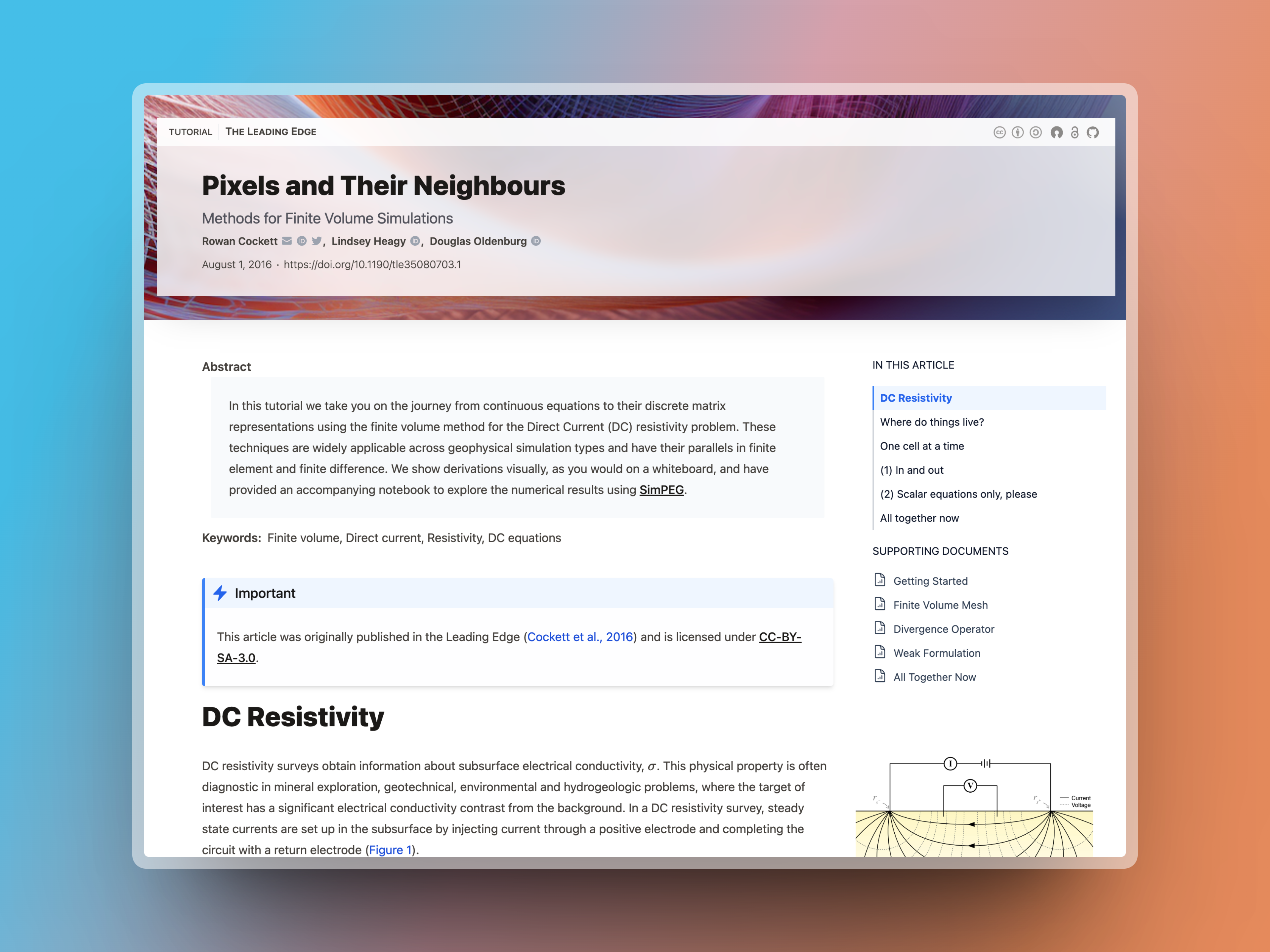
Figure 1:Example of a banner in a site using the article-theme.
Authors
The authors field is a list of author objects. Available fields in the author object are:
Social Links
Contributors and affiliations can also have social links and URLs.
Affiliations
Below are all the possible fields for frontmatter affiliations.
Table 4:Frontmatter information for affiliations
Field | Description |
|---|---|
| a string - a local identifier that can be used to reference a repeated affiliation |
| a string - the affiliation name. Either |
| a string - Name of an institution or organization (for example, a university or corporation) If your research group has a name, you can use both |
| a string - the affiliation department (e.g. Chemistry 🧪) |
| Identifiers for the affiliation (DOI, ROR, ISNI, and Ringgold). We suggest using https://ror.org if possible to search for your institution. |
| a string - email of the affiliation, required if |
| affiliation address information. In place of |
| See Table 3 for all social profile links for the affiliation |
| a phone number, e.g. |
| A fax number for the affiliation |
| a boolean - Indicate that this affiliation is a collaboration, for example, |
Date
The date field is a string and should conform to a well-defined calendar date. It should be quoted most of the time for notebook frontmatter to avoid parsing issues on the Jupyter side. Examples of acceptable date formats are:
"2022-12-14"-YYYY-MM-DD"01 Jan 2000"-DD? MON YYYYSat, 1 Jan 2000-DAY, DD? MON YYYY
These dates correspond to two main formats:
A strict (full, extended) calendar date defined by ISO 8601 (see also RFC 3339)
A date-only variant of RFC 2822, built using the RFC gammar rules.
Exports
Exports allow you to generate static versions of your MyST documents, often through intermediary build engines like Latex. For usage information, see Exporting overview.
Table 5:Frontmatter export definitions
Field | Description |
|---|---|
| a string - a local identifier that can be used to reference the export |
| one of |
| a string - name of an existing MyST template or a local path to a template folder. Templates are only available for |
| a string - export output filename with a valid extension or destination folder |
| a boolean - if |
| a list of strings - path(s) to articles to include in your export - this is required for exports defined in project frontmatter; for page frontmatter, the default article will be the page itself. Not all exports currently support multiple articles. |
| a string - path to jupyterbook |
| a list of strings - path(s) to sub-articles for |
Downloads
Downloads allow you to include downloadable files with a MyST website. They are specified in either:
In project configuration:
project:
  downloads:
    - file: ...
    - id: ...
In page frontmatter:
---
downloads:
  - file: ...
  - id: ...
---
See Downloads, Links and Static Files information about how to use this feature. Below is a list of all possible downloads configuration.
Table 6:Frontmatter download definitions
Field | Description |
|---|---|
| a string - reference to an existing |
| a string - a path to a local file. If |
| a string - either a full URL or a relative URL of a page in your MyST project. If |
| a string - title of the |
| a string - name of the file upon download. By default, this will match the original filename. |
| a boolean - this is automatically set to |
Licenses
This field can be set to a string value directly or to a License object.
Available fields in the License object are content and code allowing licenses to be set separately for these two forms of content, as often different subsets of licenses are applicable to each. If you only wish to apply a single license to your page or project use the string form rather than an object.
If selecting a license from the SPDX License List, you may simply use the “Identifier” string; MyST will expand these identifiers into objects with name, url, and additional metadata related to open access (OSI-approved, FSF free, and CC). Identifiers for well-known licenses are easily recognizable (e.g. MIT or BSD) and MyST will attempt to infer the specific identifier if an ambiguous license is specified (e.g. GPL will be interpreted as GPL-3.0+ and a warning raised letting you know of this interpretation). Some common licenses are:
Common Content Licenses | Common Code Licenses |
|---|---|
|
|
By using the correct SPDX Identifier, your website will automatically use the appropriate icon for the license and link to the license definition. The simplest and most common example is something like:
license: CC-BY-4.0Nonstandard licenses
Although not recommended, you may specify nonstandard licenses not found on the SPDX License List. For these, you may provide an object where available fields are id, name, url, and note. You can also extend the default SPDX Licenses by providing modified values for these fields. Here is a more complex example where content and code have different licenses; content uses an SPDX License with an additional note, and code uses a totally custom license.
license:
  content:
    id: CC-BY-4.0
    note: When attributing this content, please indicate the Source was MyST Documentation.
  code:
    name: I Am Not A Lawyer License
url: https://example.com/i-am-not-a-lawyerFunding
Funding frontmatter is able to contain multiple funding and open access statements, as well as award info.
It may be as simple as a single funding statement:
funding: This work was supported by University.Funding may also specify award id, name, sources (affiliation object or reference), investigators (contributor objects or references), and recipients (contributor objects or references).
authors:
  - id: auth0
    name: Jane Doe
funding:
  statement: This work was supported by University.
  id: award-id-000
  name: My Award
  sources:
    - name: University
  investigators:
    - name: John Doe
  recipients:
    - auth0
Multiple funding objects with multiple awards are also possible:
authors:
  - id: auth0
    name: Jane Doe
funding:
  - statement: This work was supported by University.
    awards:
      - id: award-id-000
        name: My First Award
        sources:
          - name: University
        investigators:
          - name: John Doe
        recipients:
          - auth0
      - id: award-id-001
        name: My Second Award
        sources:
          - name: University
        investigators:
          - name: John Doe
        recipients:
          - auth0
  - statement: Open access was supported by Consortium.
    open_access: Users are allowed to reproduce without prior permission
    awards:
      - id: open-award-999
        sources:
- name: ConsortiumVenue
The term venue is borrowed from the OpenAlex API definition:
Venues are where works are hosted.
For MyST frontmatter, the venue object holds metadata for journals and conferences where a work may be presented.
Table 8:Available Venue fields
Field | Description |
|---|---|
| full title of the venue |
| short title of the venue; often journals have a standard abbreviation that should be defined here |
| URL of the venue |
| the venue DOI |
| number of the venue in a series, for example the “18th Python in Science Conference” |
| physical location of a conference |
| date associated with the venue, for example the dates of a conference. This field is a string, not a timestamp, so it may be a date range. |
| title of a series that this venue or work is part of. Examples include a conference proceedings series, where each year a new conference-specific proceedings journal is created, or a category of articles across multiple issues, such as colloquium papers. |
| ISSN for the publication |
| publisher of the journal |
Some typical venue values may be:
venue:
  title: Journal of Geophysics
  short_title: J. Geophys
  url: https://journal.geophysicsjournal.com
or
venue:
  title: EuroSciPy 2022
  url: https://www.euroscipy.org/2022
Publication Metadata
MyST includes several fields to maintain bibliographic metadata for journal publications. First, it has first_page and last_page - these are page numbers for the article in its printed form. Also, volume and issue are available to describe the journal volume/issue containing the article. Each of these properties has the same fields available, described in Table 9.
Table 9:Available Volume and Issue fields
Field | Description |
|---|---|
| a string or a number to identify journal volume/issue |
| title of the volume/issue, if provided separately from number |
| description of the subject of the volume/issue |
| the volume/issue DOI |
An example of publication metadata for an article may be:
first_page: 1500
last_page: 1503
volume:
  number: 12
issue:
  name: Winter
  description: Special issue on software documentation
  doi: 10.62329/MYISSUE
These fields provide a more complete superset of publication metadata than the “biblio” object defined by OpenAlex API:
Old-timey bibliographic info for this work. This is mostly useful only in citation/reference contexts. These are all strings because sometimes you’ll get fun values like “Spring” and “Inside cover.”
If MyST frontmatter includes an OpenAlex biblio object, it will be coerced to valid publication metadata.



